
What is a basketball scoreboard? A basketball scoreboard is a device that displays important game information like the score, time remaining, period, fouls, and timeouts. Can I operate one without experience? Yes, with this guide, you’ll learn how to operate a basketball scoreboard easily, even if you’ve never done it before.
Basketball is a fast-paced sport. Keeping track of the action requires more than just watching the players. The scoreboard is the central hub of information for everyone involved – players, coaches, referees, and fans. From the opening tip-off to the final buzzer, the basketball scoreboard operation ensures everyone is on the same page. This guide will break down the basics of how to use a basketball scoreboard, covering both traditional manual systems and modern electronic ones.
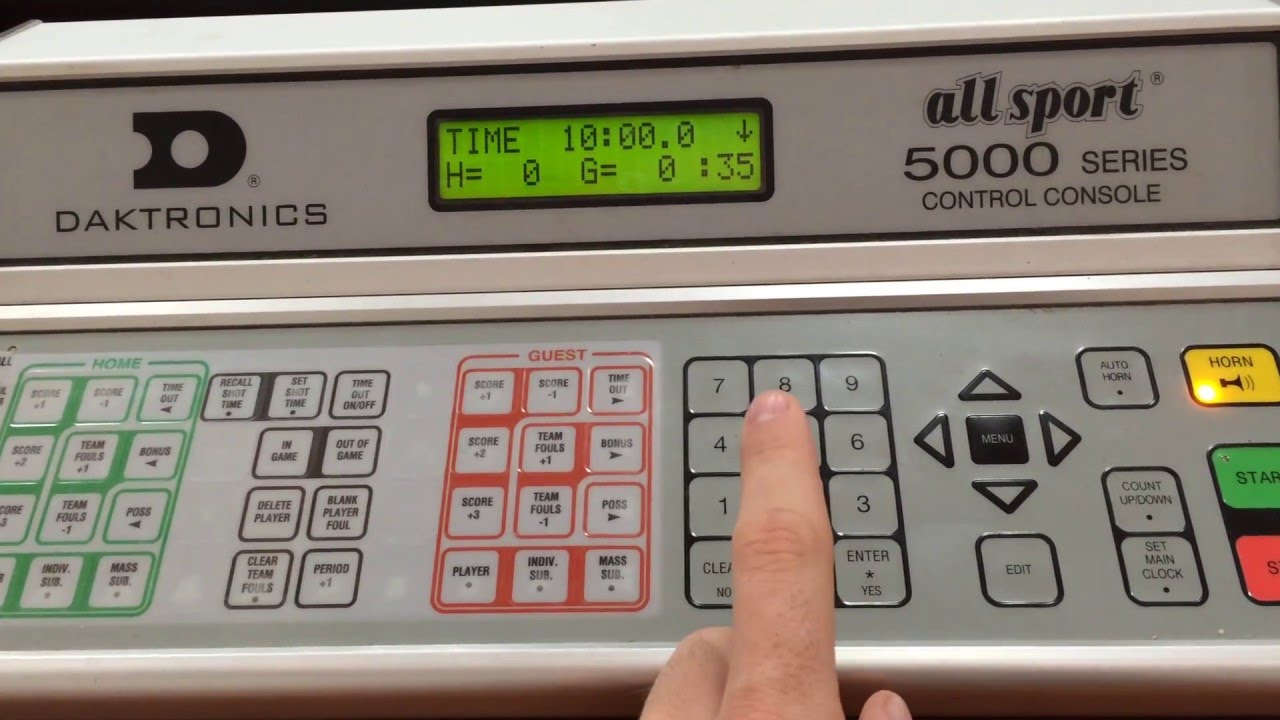
Image Source: i.ytimg.com
Deciphering the Basketball Score Display
Before you can operate a scoreboard, it’s important to know what you’re looking at. The basketball score display is designed to be read quickly and clearly.
Key Components of a Basketball Scoreboard:
- Team Scores: Typically, two large numbers show the current points for each team.
- Game Clock: This displays the time remaining in the current quarter or half. It counts down.
- Period Indicator: Shows which quarter (or period) of the game is currently being played.
- Possession Arrow: A small arrow indicating which team has possession of the ball.
- Foul Information: This can vary, but usually shows the team fouls for each side and sometimes individual player fouls.
- Timeout Information: Indicates how many timeouts each team has remaining.
Operating a Manual Basketball Scoreboard
While less common in professional settings today, manual basketball scoreboard operation is still found in many community centers and lower-level leagues. These systems rely on physical adjustments.
Basic Controls:
Manual scoreboards often have:
- Flip Numbers: Large numbers that can be manually rotated to change the score.
- Dials or Levers: Used to set the game clock and period.
- Small Flip Cards: For displaying fouls or timeouts.
Step-by-Step Operation for Manual Scoreboards:
Pre-Game Setup:
- Ensure all numbers are set to zero for the scores.
- Set the game clock to the correct starting time for the period (e.g., 10 or 12 minutes).
- Set the period indicator to “1” (for the first quarter).
- Reset foul indicators and timeout counters to zero for both teams.
During the Game:
- Scoring: When a team scores (2 points for a regular basket, 3 points for a three-pointer, 1 point for a free throw), manually flip the digits on the score display to reflect the new total.
- Game Timing: Start the clock when the ball is in play. Stop the clock when a whistle blows or the ball goes out of bounds. Adjust the clock by turning the appropriate dial or pulling the lever to reset it to the correct time.
- Fouls: When a foul occurs, update the foul count for the offending team. This might involve flipping a small card or sliding a marker. Be sure to note player fouls as well if the system allows.
- Timeouts: When a team calls a timeout, mark it off their remaining timeout count.
- Period Changes: At the end of each quarter, advance the period indicator to the next number (e.g., from “1” to “2”). Reset the game clock to the start time for the new period.
Pro Tip: It’s crucial to have a second person to verify the score and time if you’re operating a manual scoreboard. Mistakes can happen easily with physical adjustments.
Operating an Electronic Basketball Scoreboard
Electronic basketball scoreboard systems are more common and offer a wider range of features. These are typically controlled by a remote console or a dedicated computer.
The Control Console:
Electronic scoreboards are usually managed through a console with buttons, a keypad, and sometimes a small screen. The layout and specific buttons can vary greatly depending on the manufacturer, but the core functions are similar.
Essential Scoreboard Functions:
- Score Adjustment: Buttons to add or subtract points for each team. Often labeled with “+” and “-” or specific point values (e.g., “2 Pts,” “3 Pts,” “FT”).
- Clock Control: Buttons for “Start/Stop,” “Reset,” and sometimes “Home” and “Guest” clock adjustments.
- Period/Quarter Buttons: To advance to the next period.
- Foul Buttons: To log team fouls and sometimes individual player fouls.
- Timeout Buttons: To track remaining timeouts for each team.
- Possession Arrow Control: To toggle the arrow indicating possession.
- Special Indicators: Buttons for “Bonus,” “Possession,” “Shot Clock” (if integrated).
Step-by-Step Operation for Electronic Scoreboards:
Pre-Game Setup:
- Power On: Turn on the scoreboard and the control console.
- System Initialization: Ensure the scoreboard is properly calibrated. This might involve a brief self-test.
- Score Reset: Use the score adjustment buttons to set both team scores to 0.
- Clock Setup: Enter the correct starting time for the period (e.g., 10:00 for a 10-minute quarter).
- Period Setting: Set the period indicator to “1”.
- Foul & Timeout Reset: Reset all team foul counts and remaining timeouts to their starting values (usually 0 for fouls and the maximum number for timeouts).
During the Game:
- Starting & Stopping the Clock:
- When the ball is legally put into play (e.g., after a free throw, jump ball, or out-of-bounds throw-in), press the “Start” button.
- When play stops (whistle, out-of-bounds, made basket in certain situations), press the “Stop” button.
- Adjusting the Score:
- When a team scores, select the appropriate point value (2, 3, or 1 for free throw) and press the corresponding button for that team. Many systems allow you to add points directly without needing to know the current score.
- Foul Management:
- When a team commits a foul, press the foul button for that team. The team foul counter will increment.
- Some systems allow you to track individual player fouls. This typically involves selecting the player number and then pressing a foul button.
- Pay attention to scorekeeping rules basketball regarding bonus situations. When a team reaches a certain number of fouls, the opposing team might shoot free throws even on non-shooting fouls. The scoreboard might have a “Bonus” indicator you can activate.
- Timeout Tracking:
- When a team calls a timeout, press the timeout button for that team. The displayed number of remaining timeouts will decrease.
- Period Progression:
- When the current period ends, press the “Period” or “Quarter” button to advance the period indicator.
- The game clock should automatically reset to the starting time for the new period, or you may need to press a separate “Reset Clock” button.
- Possession Arrow:
- After a jump ball or a held ball, use the possession arrow button to indicate which team has the next possession.
- Starting & Stopping the Clock:
Important Consideration: Familiarize yourself with the specific manual for your scoreboard model. Every system is slightly different.
Integrating Scorekeeping Rules Basketball
Accurate basketball scorekeeping goes beyond just operating the scoreboard. You need to be aware of the scorekeeping rules basketball to ensure the information displayed is correct.
Common Scorekeeping Responsibilities:
- Tracking Points: Ensuring every made basket is accounted for and the correct point value is added.
- Recording Fouls: Accurately logging team fouls and individual player fouls. This includes knowing when a player fouls out (usually after five or six fouls, depending on the league).
- Managing Timeouts: Keeping track of how many timeouts each team has used and how much time is left on the clock.
- Period and Game Time: Ensuring the game clock is running accurately and the correct period is displayed.
- Possession: Monitoring who has possession after stoppages.
The Role of Scorekeeping Software Basketball
In many modern venues, scorekeeping software basketball is used in conjunction with the electronic scoreboard. This software can be installed on a computer or accessed via a tablet.
Benefits of Scorekeeping Software:
- Centralized Control: Allows for control of the scoreboard, shot clock, and other game-time information from a single interface.
- Advanced Tracking: Can automatically track player statistics, foul-outs, and bonus situations.
- Error Reduction: Reduces the chance of human error in manual score entry.
- Real-time Updates: Ensures all game information is synchronized across displays.
- Game Management: Some software can manage substitutions, manage player lineups, and even integrate with streaming services.
How Software Interacts with the Scoreboard:
Typically, the scorekeeping software communicates with the scoreboard through a wired or wireless connection. When an action is entered into the software (e.g., a made basket, a foul), the software sends a command to the scoreboard to update the corresponding display.
Best Practices for Scoreboard Operation
Whether manual or electronic, certain practices will ensure smooth basketball scoreboard operation.
Pre-Game Routine:
- Test All Functions: Before the game, test every button and indicator on the console and the scoreboard itself.
- Check Power: Ensure the scoreboard and console are properly plugged in and have a stable power source.
- Confirm Scoreboard Settings: Verify league-specific settings like game duration, quarter length, and timeout allowances.
- Communicate with Officials: Briefly confirm with the referees that you are ready to operate the scoreboard.
During the Game:
- Stay Focused: The scoreboard operator must remain attentive throughout the entire game. Avoid distractions.
- Communicate with Officials: Maintain eye contact with the referees. They will signal you for clock stoppages, fouls, and timeouts.
- Double-Check Entries: Quickly glance at the scoreboard after making an adjustment to ensure it’s correct.
- Know the Rules: Be familiar with basic basketball game timing and scorekeeping rules basketball. For example, knowing when the clock should stop is critical.
- Be Prepared for Stoppages: Anticipate common stoppages like fouls, timeouts, and out-of-bounds plays.
Post-Game Procedures:
- Final Score Verification: Confirm the final score with the officials.
- Power Down: Properly turn off the scoreboard and console.
- Log Game Information: If required, record game details, such as final scores and any notable statistics.
Common Scoreboard Issues and Troubleshooting
Even with the best practices, occasional issues can arise.
Table: Common Scoreboard Issues and Solutions
| Issue | Possible Cause | Solution |
|---|---|---|
| Scoreboard won’t turn on | Power cord loose, power outage, fuse blown | Check power connection, ensure power is available, check fuse on console or scoreboard power supply. |
| Scoreboard display is frozen | Software glitch, console error | Try restarting the control console. If using software, close and reopen the application. |
| Score is incorrect | Manual entry error, data synchronization issue | Re-enter the score carefully. If using software, check the data input and synchronization status. |
| Game clock not starting/stopping | Button malfunction, console connection issue | Try a different start/stop button if available. Check the cable connection between console and scoreboard. |
| Timeouts not decrementing | Incorrect button press, system not recognizing input | Ensure you are pressing the correct team’s timeout button. Reset the timeout count if necessary. |
| Period not advancing | Incorrect button press, system error | Press the period advance button again. If it persists, consult the manual or technical support. |
If you encounter persistent issues, consult the scoreboard’s user manual or contact the manufacturer’s technical support.
Mastering Basketball Game Timing
Accurate basketball game timing is one of the most critical aspects of operating a scoreboard. The game clock dictates the flow and strategy of the game.
When to Stop the Clock:
- After a Made Basket: In the last two minutes of the fourth quarter and in any overtime period.
- On any Foul: Whistle blown for a foul.
- Out of Bounds: When the ball or a player with the ball goes out of bounds.
- Jump Ball Situation: When possession is uncertain.
- Timeouts: When a team requests a timeout.
- Injuries: When a player is injured and play must be stopped.
- Violations: Such as traveling or double dribble.
When to Start the Clock:
- During a Free Throw: The clock starts when the ball is legally touched by a player on the court after the free throw is administered.
- During an Inbound Pass: The clock starts when the ball is legally touched by a player on the court after the throw-in.
Key Point: Always refer to the specific rulebook of the league or organization you are operating for, as timing rules can have slight variations.
Frequently Asked Questions (FAQ)
Q1: How do I reset the scoreboard to zero before a game?
A1: For electronic scoreboards, typically there is a “Reset” or “Clear” button, or you can manually set the scores to zero using the score adjustment buttons. For manual scoreboards, you will physically flip all numbers back to zero.
Q2: What is the difference between a manual and an electronic scoreboard?
A2: Manual scoreboards use physical mechanisms like flip numbers, while electronic scoreboards use digital displays controlled by a console or computer. Electronic ones offer more features and ease of use.
Q3: I’m operating an electronic scoreboard, and a button isn’t working. What should I do?
A3: First, ensure the console is properly connected and powered. Try restarting the console. If the issue persists, the button may be faulty, and you might need to consult the manual or seek technical assistance.
Q4: How do I know when to stop the game clock?
A4: You stop the clock on any whistle, when the ball goes out of bounds, or after a made basket in the final minutes of a game/overtime. It’s crucial to watch the referees for their signals.
Q5: Can I use my phone to operate a basketball scoreboard?
A5: Some modern scorekeeping software basketball applications can be controlled via a tablet or smartphone, especially for smaller or more basic scoreboards. However, this depends entirely on the specific scoreboard system and its compatibility.
Q6: What are “bonus” situations in basketball scoring?
A6: Bonus situations occur when a team accrues a certain number of fouls (team fouls) in a period. Once the bonus is reached, the opposing team may shoot free throws on non-shooting fouls. The scoreboard often has an indicator for this.
By following this guide, you should feel more confident in your ability to operate a basketball scoreboard. Remember, practice and attention to detail are key to accurate basketball scorekeeping and a smooth game experience for everyone involved.